Context
I’m new to piano and brand new to digital instruments in general. I want to start trying to learn piano, and I thought “wouldn’t it be nice to archive all my practice so I could listen back over time”. Turns out I don’t know anything about anything involved.
The biggest realization was that MIDI is not an audio format. MIDI records the messages and information about their notes and not the specific sounds, but it is only the set of instructions. A MIDI file needs to be combined with sounds (e.g. sampled from recorded audio) to produce listen-to-able output.
One side of the equation might be someone with a fancy microphone and a real life fancy acoustic piano meticulously recording every note to produce a “sound bank”. This is then combined with the MIDI file, as the MIDI file contains the “how” and “when” for the end audio, and the sound bank contributes the “what”.
Tools
- MIDI output device – I don’t yet have a piano, so using an Android app (MIDI Keyboard) as a placeholder
- MIDI input device – this needs to be on whenever the piano is on, so feels a bit lame to use a laptop or a keyboard. I have a Raspberry Pi 4 (or rather I have roughly a million Raspberry Pis, but only need one for this), so going to use that for the time being
- Cable for connecting MIDI output device to MIDI input device – USB-C on my Android phone to USB micro B on my Raspberry Pi. It seems like Bluetooth is also an option, but this is complicated enough without involving Bluetooth for now..
- Software to accept an incoming MIDI stream (snd-virmidi maybe?)
- Software to record an incoming MIDI stream to a file (arecordmidi)
- Software to combine the MIDI file + sound bank to produce something someone could listen to (FluidSynth)
Record a MIDI file
- Install MIDI-outputting app on the Android phone
- Ensure the app is configured to actually output MIDI (as opposed to just playing sounds on your device)

- With USB, connect Android phone to Raspberry Pi
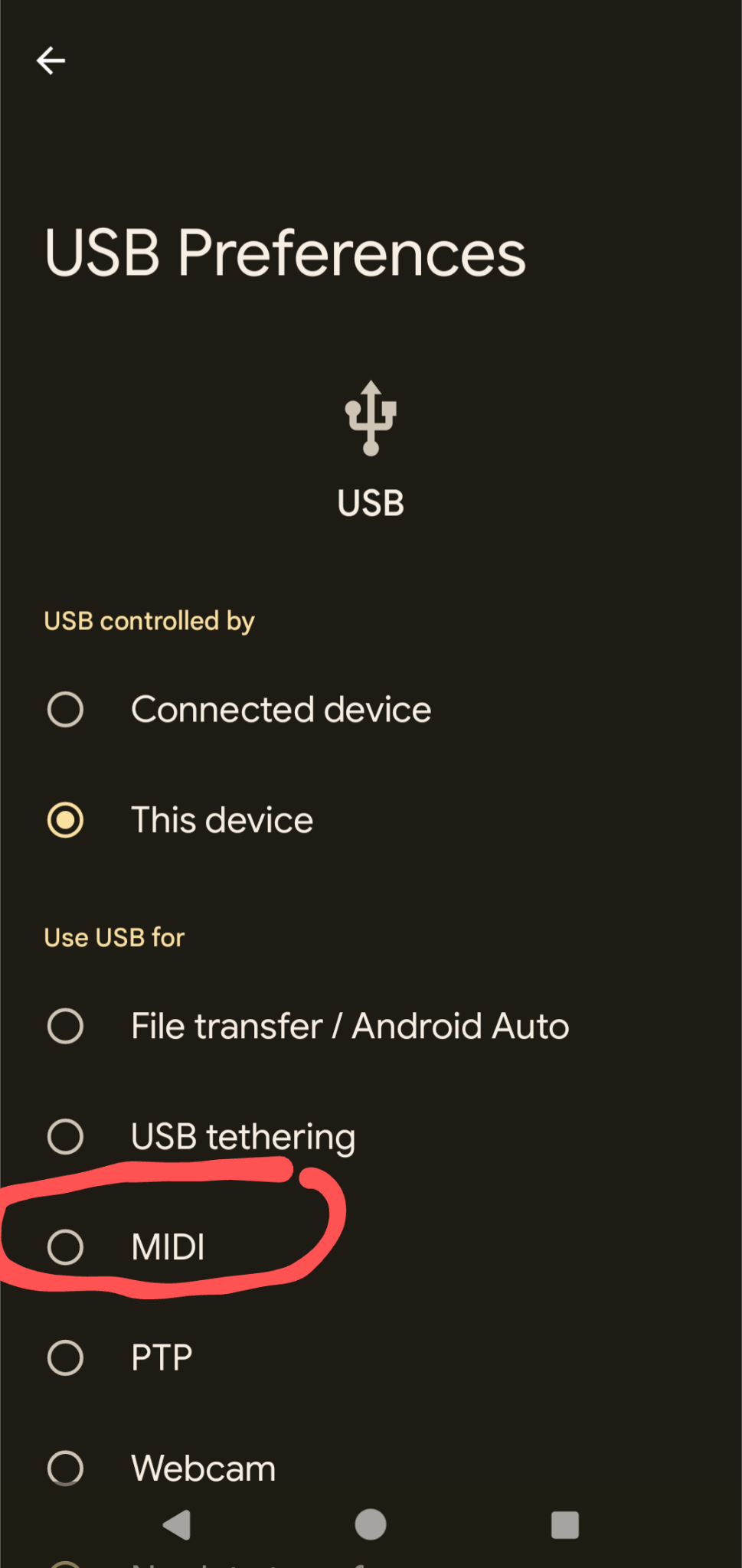
- Ensure the Android phone is set up to be a MIDI device
- On the Raspberry Pi, install alsa-utils (
sudo apt install alsa-utils) - (not sure if this is necessary or not, but…) Load the kernel module that will be used to receive the MIDI data (
sudo modprobe snd-virmidi) - List all the relevant audio input ports to find the Android device, e.g.:
$ aconnect -i
client 0: 'System' [type=kernel]
    0 'Timer           '
    1 'Announce        '
client 14: 'Midi Through' [type=kernel]
    0 'Midi Through Port-0'
client 28: 'Virtual Raw MIDI 3-0' [type=kernel,card=3]
    0 'VirMIDI 3-0     '
client 29: 'Virtual Raw MIDI 3-1' [type=kernel,card=3]
    0 'VirMIDI 3-1     '
client 30: 'Virtual Raw MIDI 3-2' [type=kernel,card=3]
    0 'VirMIDI 3-2     '
client 31: 'Virtual Raw MIDI 3-3' [type=kernel,card=3]
    0 'VirMIDI 3-3     '
client 32: 'Pixel 6a' [type=kernel,card=4]
0 'Pixel 6a MIDI 1 '- sanity check that MIDI is making it from your phone to the Pi by listening to MIDI data and playing notes
$ aseqdump -p 32:0
Waiting for data. Press Ctrl+C to end.
Source  Event                  Ch  Data
 32:0   Note on                 0, note 54, velocity 100
 32:0   Note off                0, note 54, velocity 100
 32:0   Note on                 0, note 56, velocity 100
 32:0   Note off                0, note 56, velocity 100
 32:0   Note on                 0, note 58, velocity 100
 32:0   Note off                0, note 58, velocity 100
 32:0   Note on                 0, note 61, velocity 100
 32:0   Note off                0, note 61, velocity 100
 32:0   Note on                 0, note 61, velocity 100
 32:0   Note off                0, note 61, velocity 100
^C- start recording MIDI data (
$ arecordmidi -p 32:0 example.mid) - play anything on the device
- stop recording MIDI data (hit
ctrl + cto kill the recording)
At this point there should be a file (example.mid) that contains the “instructions” to reproduce what you just played. Depending on how speedy you were, there might be a lot of silence before and after the notes, but that’s a problem for another day.
Combine MIDI and sound bank to produce sounds
With a MIDI file we’re most of the way home. At this point you can’t listen back to the recording or share it with other people though, as there are no sounds associated with the instructions captured in the MIDI file.
Of note is that the sound bank can be anything – a glorious recording of a real concert piano, pitch shifted farts, or anything else under the sun. MIDI + ??? = song
The most straightforward way I’ve found (after literal seconds of looking) to get sounds out of a MIDI file is with FluidSynth. If it’s not already installed, easy to install with sudo apt install fluidsynth. It appears to ship with some default sound banks, so easiest to start with one of those (/usr/share/sounds/sf2/FluidR3_GM.sf2):
$ fluidsynth -a alsa -o audio.alsa.device=hw:0 -g 1.0 /usr/share/sounds/sf2/FluidR3_GM.sf2 example.mid -F example.wav
FluidSynth runtime version 2.3.1
Copyright (C) 2000-2022 Peter Hanappe and others.
Distributed under the LGPL license.
SoundFont(R) is a registered trademark of Creative Technology Ltd.

Rendering audio to file 'example.wav'..
And tada! Play example.wav with whatever software you’d like! Relatively speaking the file will be huge, so likely makes sense to compress it into an MP3 or similar (e.g. with lame example.wav example.mp3). For my nonsense test data the MIDI file is 258 bytes, the WAV file is 1.9 MB and the MP3 is 175 kB, so there are huge space savings to be had.
Summary
- tap away in an Android piano keyboard app
- app sends MIDI over USB
- Raspberry Pi receives MIDI over USB
- arecordmidi saves that stream of MIDI as a MIDI file
- FluidSynth combines the MIDI and a sound bank into audio
- human celebrates and shares WAV (or MP3) with friends and family, receives accolades
Open questions…
- How can I automatically record the audio any time I start playing on the piano?
- How can I automatically stop recording the audio when I’m done playing?
- How can I trim the audio so I’m not storing silence?
- How can I automatically slice an audio stream into discrete recordings so I could get different pieces out of one practice session?
- How can I automatically back up my audio recordings in a chronologically organized directory?
- How can I find time to play piano when I’m mucking with piano adjacent software and utilities?
 Technically Rural